How to send Free SMS using Facebook.

Leave a Comment
Hi Friends. I've already Shared a number of posts on how to send free sms from the internet, Or how to send Anonymous sms.  Well but today i'm back with something that's gonna interest you all deeply. We all are well aware of the Social Networking Giant "Facebook" . . So today i'm gonna show you gyes how to send free sms Using Facebook. Yeah its possible.

Process:

  • Login to your Facebook Account.
  • Search for "ChatSMS Application"
  • Then Click on "Allow"
  • Now select the Country and the Country Code of the country where  you want to send the sms.
  • In the Phone Number Field give your Friends phone number where you want to send the sms.
  • Now type your sms.
  • And click on"Send Sms"

  • Done. !! Hope it helped you.

Plz Leave Feedback.
Read More

how to recover your files from Mega Upload.

Leave a Comment
Hi Friends. As many of you might already know that the uploading giant megaupload has been Shut down by the FBI. The reason for this has been stated as "The site on megaupload.com was violating the Copyright Violation".
Now many people had a backup of their data or some other important data on megaupload. So today i'm here with a trick to recover the files even after the site has been shut down.

Basic Idea Behind the Process:
The idea behind this process is that whenever you upload any file on megaupload, hotfile or any file uploading giant then the file automatically gets shared on other uploading sites.So by the process i'm gonna post here, you'll not get the file from Megaupload but you'll get the file from some other file sharing site.

Process:

  • You'll need to know the exact file name and file size. Or you must have the file URL
How to find the exact file name and file size using the URL
  • Go to google
  • Search for the URL of your file
  • Possibly you'll get the file name and the file size

How to get the file using the File name and file size:

  • Search for the file name on google
  • see if its available on other sites except megaupload
  • you might get the filename on megaupload but cant download it so look for the file on other file sharing sites.
  • When you get it Just Download it.

Hope it helped you.
please leave Feedback.


Read More

How to Send colorful text in Facebook Chat.

Leave a Comment
Hi Gyes. In todays date it'll be hard to find a single person who doesn't know or use FACEBOOK. But it'll be as equal hard to find a single person who is familiar with all the Facebook hidden geeks and tricks. Its almost unbelievable to hear that we can send colorful text on facebook chat. infact we can even send any pic we want in Facebook chat.

Basic Concept:


Facebook has made quite a lot of new intigrations newly. Now there;s a new feature that we can send any pic to anyone by using his Username or UserId. Means whenever we type the username or UserId in [[username]] or [[userID]] format then the profile pic associated with that page or profile is sent.

What are user Id's and Usernames:


They are unique number associated with each profile or each page. Whenever we visit that profile or page then just look at the address of the page or profile.

How to use these numbers and Id's to send pix

  • Copy the Username or UserId
  • type the userId or Username in this format [[Username]] or [[UserId]]
  • lol......the profile pic would be sent. !!

How to send Colorful text in Facebook chat :

We've already Created 24 facebook profiles with different alphabets of English. So here are the codes for Each alphabet. But be sure to Insert a space between each alphabetic code.


[[107015582669715]] = A
[[116067591741123]] = B
[[115602405121532]] = C
[[112542438763744]] = D
[[115430438474268]] = E
[[109225112442557]] = F
[[111532845537326]] = G
[[111356865552629]] = H
[[109294689102123]] = I
[[126362660720793]] = J
[[116651741681944]] = K
[[115807951764667]] = L
[[106596672714242]] = M
[[108634132504932]] = N
[[116564658357124]] = O
[[111669128857397]] = P
[[107061805996548]] = Q
[[106699962703083]] = R
[[115927268419031]] = S
[[112669162092780]] = T
[[108983579135532]] = U
[[107023745999320]] = V
[[106678406038354]] = W
[[116740548336581]] = X
[[112416755444217]] = Y
[[165724910215]]        = Z


I'll soon Update this page with more stylish fonts for Facebook chat. So Plz re-visit withing 24hrs for more Stylish Fonts.

plz Leave Feedback.
Read More

Convert Your Firefox Into a Keylogger

Leave a Comment
Hi friends. Most of you Know what a keylogger is, isnt  it ? Well today i'm gonna post how to But the problom is most keyloggers are demo and bying them costs a lot. So why not use what we have as what we want ?  This process is too simple to be called a hack. Still it helps in hacking so Lets Go. !

*For those who do not know what a keylogger us kindly Read my Detailed Article on Keyloggers.
  "Read on Keyloggers here."

How it works:

  • We just change firefox a lil so that each and every password and email typed are automatically saved.
  • Later we can use Firepasswordviwer to retrieve the passwords.

Process
  • Download the Script from Here
  • go to " C:/Program Files/Mozilla Firefox/Components"
  • now search for a file "nsLoginManagerPrompter.js" and backup it or copy it somewhere safe.
  • Now open the script you've downloaded, there you'll find  "nsLoginManagerPrompter.js" paste it to where the original script was.
  • Done ! Now each and every E-mail and password typed will be saved automatically.

How to get the Details:
  • Download Free PassWordViwer from here. 
  • Install or Run it
  • Click on "Start Recovery"
  • Click on "Show Passwords"
  • Done.!!

Hope this helped You !! Plz Leave Feedack.

Read More

What are RATS and How The Work.

Leave a Comment
Gyes. A RAT is the abbreviation for Remote Administration Tool. Almost all of us ae familiar with what is "Trojan". Well so a Trojan is the most dangerous form of a rat.

What Is a RAT:
A RAT is such a program which gives you full access to the victim's computer. It is most widely spread using .bat files. A Trojan is a good infact best example of a RAT.

How it  works:
The hacker has to Bind (hide) the RAT in a image file or any else file. When the victim views the image or opens the binded file the batch file of the RAT gets executed and upon execution it opens a Port on the victim's Pc and then bind itself to the port.
Once the RAT has binded itself to the port, The hacker can enter the victim's Ip and gain Full control over the Victim's machine.

Features of a RAT:

  • Screen Control.
  • File Management
  • Shell control
  • Full PC control
  • Registry control
  • Some other Functions vary according to the OS.

In my next post i'll Tell you how to hack using RAT. Plz Leave Feedback friends.


Read More

How To UPDATE your Windows OS without Internet Connection

Leave a Comment
Hi friends. We all know that Microsoft is the Giant of computer industry. And it also kepps on releasing windows update to keep our pc safe and updated. But the problem is that most of us use Mobile to connect to the internet or other means such as Photon+ or Skynet etc. But updating your os needs a high speed internet connection . So today i'm here with a solution for all of you gyes. using this simple process you can Download the offline installer of Windows OS updates and can later on install those updates on your pc.

Process:

  • Get a pendrive and go to any cyber cafe or anywhere where high speed net connection is available.
  • Download AUTOPATCHER from here. Click here 
  • Install and run  it.
  • Select the OS
  • Click "NEXT"
  • Now for 32-bit Os select "X86" or else select X64
  • Select all the updates you wanna download
  • After the download completes Copy it in your pendrive
  • And install on your Home PC.
  • DONE !!
Plz leave Feedback Gyes.
Read More

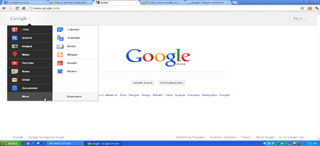
Grab the New Google Look and The New Sidebar Before It's Officially launched.

Leave a Comment
Hi Friends. We all are well familiar wth the internet giant GOOGLE. After it found out the google+ , its customizing every of its products with a new look. At the same time the developers of google have customized even google . They have created a new SIDEBAR for google instead of that old, slanky little bar at the top. But they have'nt launched it yet. But What use are we if we can't achieve what others can't ? Well so today i'm gonna show you how to get the google new Gorgeous sidebar before its officially launched.

Process:
  • First of all Download the Extension "EDIT THIS COOKIE" for Google chrome from here. Download
  • Now open www.google.com in your browser.
  • Right click anywhere on the page.
  • Now select "Edit Cookies"
  • In this new window replace whatever is written in the value field by the below text:

  • ID=03fd476a699d6487:U=88e8716486ff1e5d:FF=0:LD=en:CR=2:TM=1322688084:LM=1322688085:S=McEsyvcXKMiVfGds
  • Now click on "Submit Cookies" .
  • Refresh your google page and Enjoy the New look.
  • Done !


Read More

How to Remove Facebook Timeline

Leave a Comment
Hi Gyes. Most of us who have Facebook accounts have already enabled facebook timeline on our Profiles. But still some of us are regrating our acts. There are many people who are familiar and accustomed to their old profile looks and processes, Deactivating timeline is OFFICIALLY not possible but theres always a second way, and today i'm gonna introduce you that way. So here's a simple process how we can remove the timeline view and get our old profile look back.

Requirements:

  • Mozilla Firefox
  • User Agent Switcher Add-on
How to Get USER AGENT Switcher Add-on:
  • Open your Mozilla Firefox Browser
  • Go to tools.
  • go to add-on
  • In the top-right corner there is a Search box.
  • Type USER AGENT SWITCHER in the search box
  • Install the Add-on
How to Use it to Remove Timeline
  • After installing re-start your browser.
  • go to tools
  • go to "default user agent"
  • Select "Internet Explorer 7"
  • Log-in to facebook.
  • Done !! You have Your Old Profile back.

Plz Leave Feedback Gyes.
Read More

Tabnapping. Full process and File Download

Leave a Comment
HI friends. Today In my previous post i explained "What is Tab-napping". In my this post i'm going to show you how to use Tab napping to hack accounts. And at the end of this post you'll also get the napping page that can be downloaded and the good news is that you DO NOT need to edit anything in  that because I've done all those stuff.

If you do not know what is tab napping, then please read my previous post " What is Tab Napping And How It Works."

Process:


  • Download the Tab Napping page Here. (password : hackingmyworld )
  • DOWNLOAD

What is there in the Napping page:
The Tab napping page you just downloaded consists some files. Most important the index.html file. I've designed the index.html page as a webpage that looks like a gaming website. When you give the link to your victim and he clicks on the link he will be able to play the game for 10Sec without any problom and then the page will change to  GMAIL log-in page . He will think that to play the full version game he must log-in,And as soon as he does, His password is yours !

Why I chose Only a Gaming Page:
Well friends it took me quite a bit of time to think what type of page i wanna use as the main page. I tried google.com pages but when the google page changes to the gmail log in page the victim suspects and he mostly doesn't log-in . And so i created a gaming page so that when the page changes to gmail page he doesn't suspect anything and logs-in.


Process:
  • After download the napping files. Extract the contents of the compressed file.
  • Upload all the files of the TAB NAPPING folder to a free web hosting site. ( 110mb.com , my3gb.com)
  • Now give the link of the index.html file to your victim by chat or anyway possible.
  • As soon as he logs in, a new text document will be created in the same directory where you uploaded the files with the name "passwords.txt" . open this file and you'll get the details the victim used to log-in to his account.
HAPPY HACKING
PLZ LEAVE FEEDBACK .


Read More
Next PostNewer Posts Previous PostOlder Posts Home
Powered by Blogger.